
Free Spanish Spell Check Software
AbiWord is a free Spanish spell check word processing software that you can use right now.
You're learning the Spanish language. You're reading it, you're speaking it, you're writing it...
You might be sending emails and writing documents on your computer in Spanish. And if you are writing documents on your computer in Spanish, you will probably want to have a Spanish spell checker. You know how important it is to have correctly spelled documents.
You need a Spanish spell checker in order to check the electronic documents you create in Spanish. Most common word processing programs don't include a Spanish version of the spell checkers. And the Spanish spell checkers for some popular word processor programs are expensive add-ons.
Doing a spell check is a great "final step" whenever you send an email in Spanish, or post in Spanish to an online forum or newsgroup.
Interestingly for Spanish students, according to Wikipedia, AbiWord (which is pronounced Abby Word) gets its name from the Spanish word "abierto", which as you know means open in Spanish.
AbiWord works on Windows, Mac, and Linux computers.
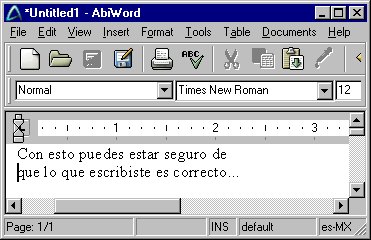
Perhaps you write often in Spanish on your computer and need to do a Spell check on what you've written. But even if you don't, the practice of typing and then spell checking is a great tool for learning Spanish. It's a good test of your Spanish proficiency to write a letter or other correspondence on the computer and then give it a spell check. When I was learning Spanish, one of the items I didn't give much attention to were the accent marks above the letters of certain words -- like the í in aquí. This was always a weak point and basically meant I was a bad speller in Spanish. But when I began typing Spanish letters, emails, and articles into the computer and then doing a spell check -- I quickly learned to pay attention to the accents and write the words correctly.
AbiWord is Professional Quality Software similar to all popular word processing programs that you can download and install on your computer and do spell checking of your Spanish documents.
The AbiWord web site has a lot of information about the product, including screenshots, a product tour, and reviews. Also while you're there, be sure to download the Spanish dictionary file. (and any other languages you might be interested in). The Spanish word dictionary file is called AbiWord_Dictionary_Espanol.exe -- Installation of the Spanish dictionary add-on is a straightforward process. When you have both files on your computer you simply run the dictionary exe file to install the Spanish spell check on AbiWord.

Using The Spanish Spell Checker
You can of course type directly in to the AbiWord word processing or you can paste text in from other programs (such as email) that need to have the text spell checked.
When you start the AbiWord program, the default language will be set. You can easily change the document language to Spanish, English, or any language you need. The way to set the language of the document you want to spell check is in to Tools menu. In the Tools menu, click on "Set Language" and then select Spanish from the list of options. Any languages for which you have installed a dictionary file will have a check mark and the letters ABC next to it. Just select your language and the document you have open will get spell checked in Spanish. Installing the single AbiWord_Dictionary_Espanol.exe file mentioned above supplies two options in this language selection dialog: Spanish(Mexico) and Spanish(Spain). Simply choose the one that's most appropriate for your audience. There's also a check box to make the selected language the default for the current document.
It's very easy to get used to using AbiWord because it operates like all the common word processing programs. AbiWord has the familiar feature that puts a wavy red line under words that need to have corrections made to them. When you see a misspelled word with the wavy red line under it you simply right-click on the word and select from the list of optional replacement words. Familiar, easy and simple to use -- get your copy today.